Honest comparison from a working contractor

JobMargin vs Jobber: A Contractor's Honest Comparison

Jobber is the incumbent in field service software. Comprehensive, well-funded, mature. If you've been looking at options, you've seen them. Here's what their pricing actually gets you, what they gate at higher tiers, and what JobMargin is built for that Jobber isn't.

Start Your Free Trial →

14 days free · No credit card · Cancel anytime

JobMargin dashboard showing job margin on mobile

The Incumbent vs a Purpose-Built Tool

Jobber serves the home service category broadly. HVAC, plumbing, electrical, landscaping, roofing, lawn care, cleaning — nineteen industries on their site. They've been building for over a decade. The product is mature, the integrations are deep, and the feature set is wide.

I'm not going to tell you Jobber is bad. It isn't. If you want the biggest name in the category with the most integrations and the most ecosystem around it, Jobber is a legitimate choice and millions of contractors use it every day.

What I'll tell you is what I know: Jobber is built for home service operations broadly. JobMargin is built for one specific problem — seeing true margin on every estimate before you click send, with indirect cost allocated per job, so you know what you're keeping before you price the next one. That's not a feature Jobber offers at any tier. They have job costing at their $149/month Grow tier, which is retrospective. JobMargin's margin card is on the estimate screen, live, at every tier.

That's the real comparison. Everything else on this page is pricing, tier gates, and honest credit where it's due.

True Margin on the Estimate Screen — Before You Click Send

When I'm pricing a job, I want to know what I'll actually keep. Not what I'll invoice. Not what's left after materials. What I'll keep after my indirect costs are allocated — truck insurance, commercial liability, licensing, fuel, workers comp, software, credit card interest — all the things that it takes to run your business that come off the top every month whether you worked or not.

I ran the numbers on my own business last year. It costs me $59.63 per hour of indirect cost to pay myself a living wage and cover everything else. If my truck is leaving the driveway, I know it costs me nearly sixty dollars an hour just to operate.

Jobber calls their feature "job costing." It's gated at Grow, their $149/month tier. And based on their public documentation, it appears to be retrospective — you look at what a job actually cost after the fact. That's useful. It's also completely different from what I'm describing.

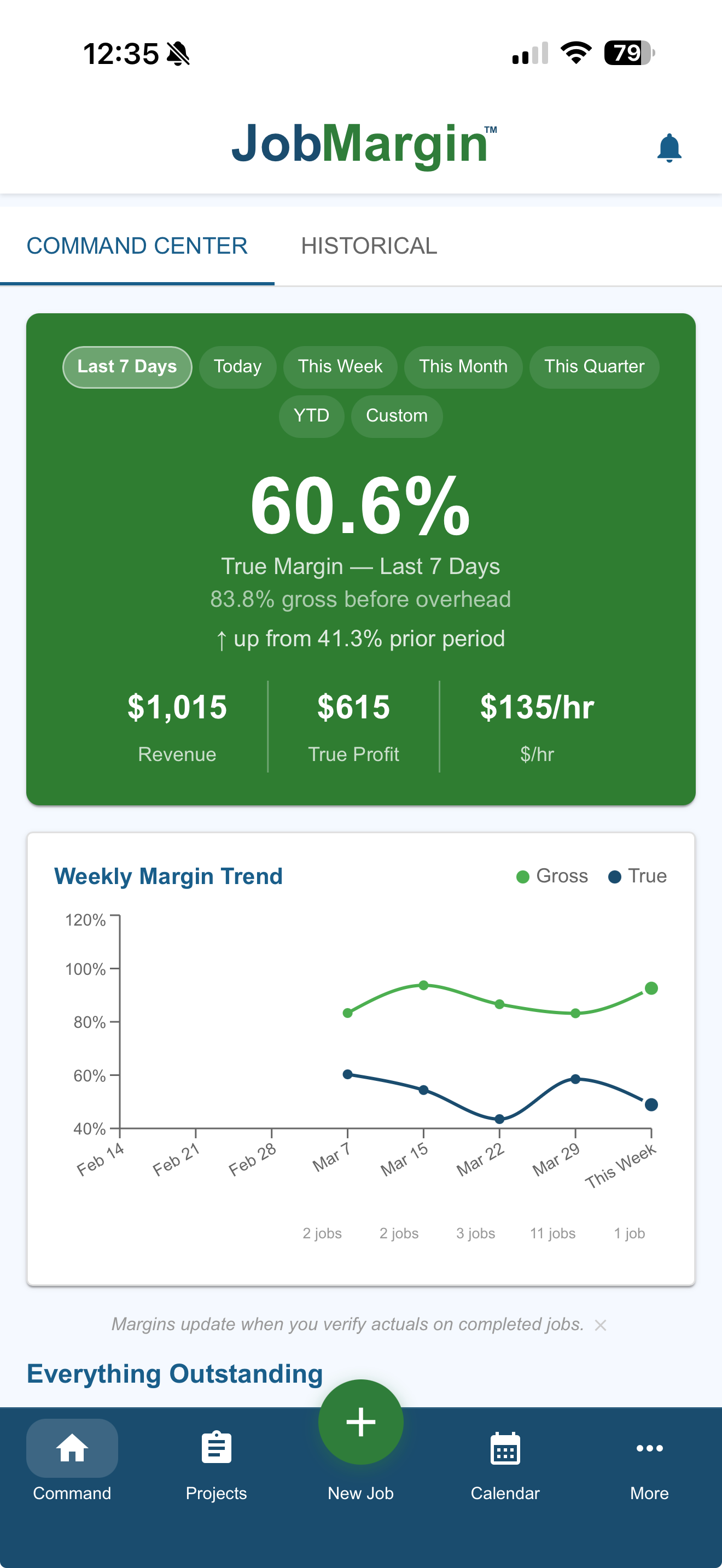
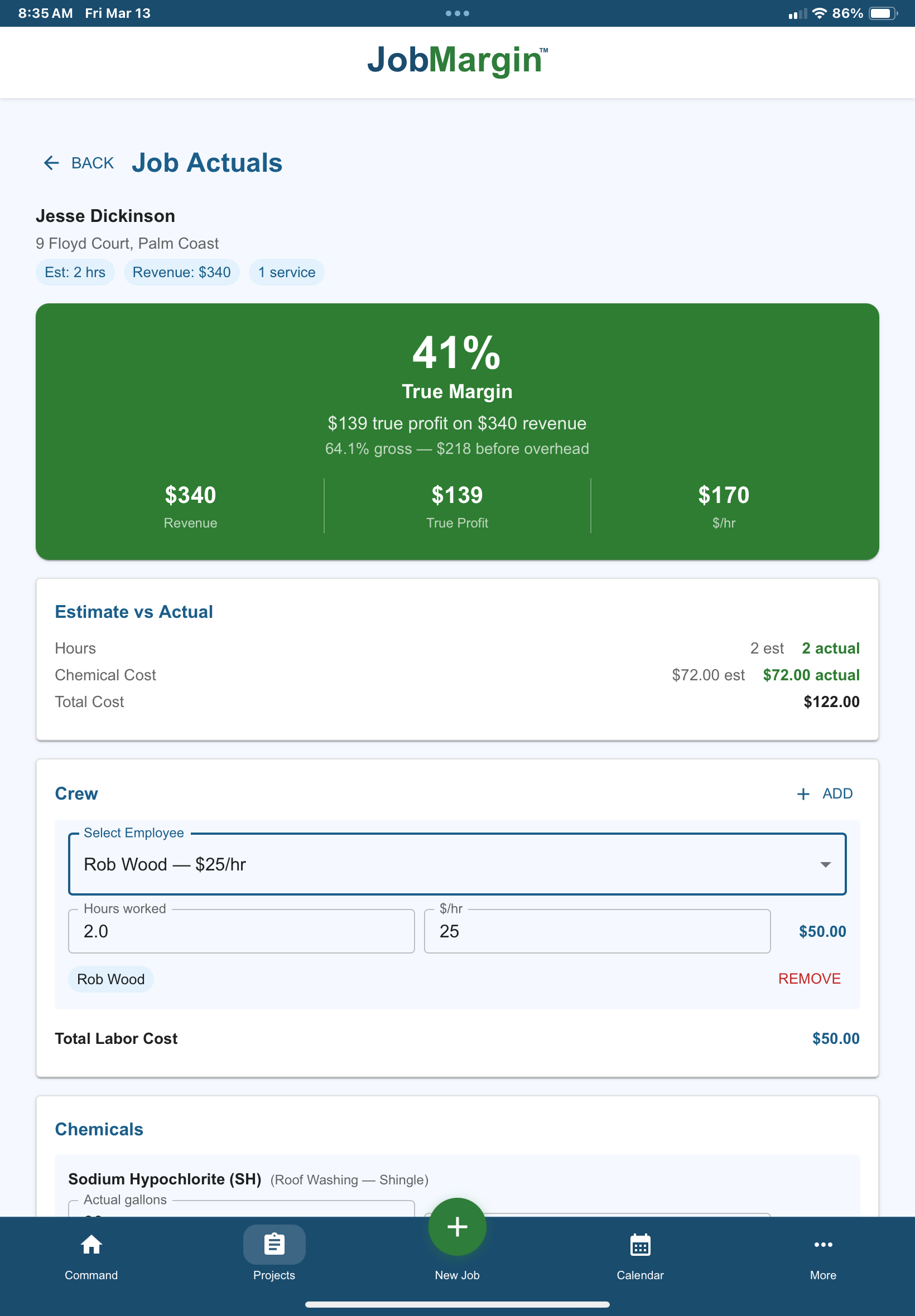
JobMargin's margin card sits on the estimate screen as I build the quote. I see revenue, gross margin, and true margin after my indirect costs are allocated — live, updating as I enter services and materials. If the number's right, I send. If it isn't, I don't.

I lost a roof job earlier this year because I priced it at $0.40 a square foot. Looking at the numbers after, I could have flexed to $0.20 and still made 35% true margin. I didn't have the margin card in front of me when I sent the estimate. I would have won the work.

You'd never click send in the blind. That's the whole reason JobMargin exists, and it's the one thing Jobber doesn't solve at any tier.

JobMargin estimate screen showing true profit margin before sending — revenue, cost, and true margin visible on a single card

Jobber Gates QuickBooks Sync at $99. JobMargin Includes It at $59.

If you're going to be a small business owner, you need good books from day one. I'd rather pay a bookkeeper forty dollars a month to clean up my QuickBooks than scrape CSV files and bank statements at year-end. Set good habits early. It saves you heartache later.

Jobber's entry tier is Core at $29/month for one user. Core does not include QuickBooks Online sync. To get QB sync, you have to jump to Connect at $99/month — more than triple the Core price.

JobMargin Starter is $59/month and includes QuickBooks sync. Pro at $129 includes it. Enterprise at $199 includes it. Every tier. No gate.

This isn't a small difference. A solo contractor starting out who needs QB sync from day one is choosing between $29/month at Jobber with no books integration, $99/month at Jobber for their cheapest QB-enabled tier, or $59/month at JobMargin with books integrated from the start. The honest math says JobMargin Starter saves you $40/month over Jobber Connect at the level where QB sync is on.

Pricing: What You Actually Pay For

I'm going to do this honestly. Jobber's entry tier is cheaper than JobMargin's entry tier at the single-user level, and I won't hide that.

At the solo level: Jobber Core is $29/month for 1 user. JobMargin Starter is $59/month for 1 user. Jobber is thirty dollars a month less. The catch: Jobber Core doesn't include QuickBooks sync, automated client notifications, two-way text messaging, automated quote follow-ups, expense tracking, routing, GPS tracking, or job costing. Those are all gated at higher tiers. JobMargin Starter includes QuickBooks sync, true margin on every estimate, recurring services, and the margin reporting.

At team scale: Jobber Connect at $149/month (team-tier pricing for 5 users) vs JobMargin Pro at $129/month for 5 users. JobMargin Pro is $20/month less and includes customer portal, crew management, commission engine, and the margin card on every estimate. Jobber Connect includes automated notifications, expense tracking, GPS, and routing — but no two-way text, no custom automation, no job costing.

At larger team scale: Jobber Grow at $299/month (team-tier, 10 users) gives you job costing, two-way text, custom automation, and advanced quote customization. JobMargin Pro at 10 users is $179/month ($129 base + 5 extra users at $10 each). Or JobMargin Enterprise at $199/month with unlimited users.

At the top: Jobber Plus at $529/month for 15 users. JobMargin Enterprise at $199/month with unlimited users. That's a $330/month difference, and JobMargin includes the commission engine and campaigns that are add-ons or top-tier-only on Jobber.

At team scale and above, JobMargin is meaningfully less expensive than Jobber. At solo entry without QB sync, Jobber is cheaper. That's the honest math.

What Jobber Gates, and Where

Jobber's pricing model is tier-based. Features unlock as you pay more. That's normal for SaaS. Worth knowing exactly what's on the other side of each gate:

Gated at Connect ($99 solo / $149 team):

  • QuickBooks Online and Xero sync
  • Zapier
  • Gusto
  • Automated client notifications
  • Automated invoice follow-ups
  • Automated quote follow-ups
  • Expense reporting
  • GPS tracking
  • Routing
  • Job Forms

Gated at Grow ($149 solo / $299 team):

  • Job costing (retrospective)
  • Two-way text messaging
  • Custom automation builder
  • Advanced quote customization
  • Optional add-ons and markups

Gated at Plus ($529 team, 15 users):

  • Receptionist (otherwise a paid add-on)
  • Pipeline (beta)
  • Marketing Suite (otherwise a paid add-on)
  • Unlimited white-glove onboarding
  • API access

JobMargin's approach is different. True margin on every estimate, QuickBooks sync, recurring services, and the core workflow are at every tier. Features like customer portal, crew management, and crew dispatch unlock at higher tiers — same model — but the margin engine that determines whether your pricing is right is never gated.

Where Jobber Is the Legitimate Choice

Jobber has real advantages. A few worth naming:

The integration ecosystem is bigger. Jobber has been building integrations for over a decade. Home Depot, Gusto, QuickBooks, Xero, Zapier, mature app marketplace. If you're running a business that depends on specific integrations, Jobber likely has what you need. JobMargin is newer — we have QuickBooks sync and Stripe built in, and we're building out the marketplace.

The mobile app is mature. Jobber's iOS and Android apps have been refined over years of use by millions of contractors. JobMargin is responsive web, which works on iOS and Android browsers — a native app is on our roadmap, not shipped yet.

The industry list is broader. Jobber covers HVAC, plumbing, electrical, roofing, and several other trades explicitly. JobMargin today serves pressure washing, car detailing, painting, paver/concrete, paver sealing, and lawn care. Small engine repair, cleaning, and training come next. If you're in an industry we don't cover yet, Jobber is probably the better fit until we get there.

AI features included across tiers. Jobber has AI Voice and AI Chat features at all tiers. They're investing in AI as part of the product. JobMargin is a margin tool, not an AI tool — if AI features matter to you as a product value proposition, Jobber has invested in that space.

The company has been around. Jobber is a well-funded, stable company. JobMargin is newer. If company longevity matters to your decision, Jobber is the more established choice on paper.

I don't want you to walk away from this page thinking Jobber is bad. It isn't. It's a legitimate choice for a lot of contractors, and the pressure washing version works well for pressure washers. I built JobMargin because I wanted a different thing — a tool where the margin math happened on the estimate screen before I sent the quote, on every tier, without paying $149/month to unlock it.
Where JobMargin Is Built Different

True margin on every estimate, every tier. Not gated. Not at the top. On the Starter screen the first day you sign up. The margin card updates live as you build the quote. You see what you keep after your indirect cost is allocated per job.

QuickBooks on every tier, starting at $59. No upgrade required. Small businesses need books from day one, and the software shouldn't make you choose between affordability and accounting hygiene.

Commission and compensation math, not just payroll. JobMargin Pro handles per-line-item commission rates. Three employees on the same job with three different compensation packages — the software calculates it at the end of the week. This came from a paver sealing contractor who asked me whether my software could handle the 9% he paid on paver work versus the 19% on pressure washing. We built it. Jobber has payroll reports and time tracking. Not this kind of multi-model commission math.

Vertical-specific setup. Jobber is built for home services broadly. JobMargin preseeds with your trade's services, consumables, and terms — a business in a box with your DNA on it before you click anything. Pressure washing, car detailing, painting, paver sealing, paver/concrete, lawn care, each with its own setup.

Unlimited users at $199/month Enterprise. No per-user penalty. No cap at 15 like Jobber Plus. Run a ten-crew operation or a twenty-crew operation — same price.

Campaigns and offers included at Enterprise. Jobber's Marketing Suite is a paid add-on at every tier except Plus. JobMargin includes four-channel campaigns in Enterprise at $199/month.

Feature Comparison

JobMargin Jobber
Starting price$59/mo (Starter)$29/mo (Core)
Team entry$129/mo, 5 users (Pro)$149/mo, 5 users (Connect team)
Top-tier price$199/mo unlimited (Enterprise)$529/mo, 15 users (Plus)
True margin on estimate screen✓ all tiers
Indirect cost allocation per job✓ all tiers
Job costing (retrospective)✓ all tiers✓ Grow and above
QuickBooks sync✓ all tiers✓ Connect and above
Customer portal / Client Hub✓ Pro✓ all tiers
Crew dispatch (day/week/list)Pro add-on or EnterpriseScheduling only
Commission engine (line-item)✓ Pro
Campaign / marketing✓ EnterpriseAdd-on except Plus
Automated client notifications✓ ProConnect and above
Two-way textProGrow and above
GPS trackingFuture add-onConnect and above
RoutingFuture add-onConnect and above
Vertical-specific setup✓ by tradeGeneric
User capUnlimited at Enterprise15 at Plus

Which One Is Right for You

Choose Jobber if: you're in HVAC, plumbing, electrical, or another home service trade JobMargin doesn't cover yet; you need a mature mobile app and a deep integration ecosystem; you're a solo operator and $29/month without QuickBooks is the right starting point; or you want the incumbent brand in the category. Jobber has built a comprehensive platform over a decade and it works well for millions of contractors.

Choose JobMargin if: you want true margin on every estimate before you click send, on every tier, without upgrading to unlock it; you want QuickBooks sync at the entry price, not gated; you want a commission engine that calculates per-line-item rates for crews paid on a mix of hourly and commission; you're running enough users that unlimited at $199 saves you meaningful money versus per-user pricing at Jobber; or you're in a trade where vertical-specific setup matters more than a generic toolkit.

Both tools will handle the transactional side of your business — estimates, invoicing, scheduling, payments. What's different is what they optimize for. Jobber optimizes for admin reduction and operational scale. JobMargin optimizes for margin visibility. Pick the one that matches the problem you're actually trying to solve.

Frequently Asked Questions

Is Jobber's "job costing" the same as JobMargin's true margin?

No. Jobber's job costing is gated at the Grow tier at $149/month and, based on their public documentation, is retrospective — it tracks actual costs after the job is complete. JobMargin's margin card is live on the estimate screen before you click send, and it includes indirect cost allocation per job. Same label, different features. The timing matters — retrospective job costing tells you what happened. Estimate-screen true margin tells you what will happen if you price at this number.

Why does Jobber gate QuickBooks sync at $99/month?

You'd have to ask them. My read is that it's a common SaaS pricing strategy — use QuickBooks as the upgrade trigger. A contractor who wants QB sync has to jump from $29 to $99 to get it. That's $70/month of upgrade pressure. JobMargin's pricing is built around the opposite philosophy — if you're running a business, you need QB sync from day one, and the software shouldn't make you choose between affordability and accounting.

Does JobMargin have a mobile app?

Yes and no. The app is responsive and runs on iOS and Android mobile browsers — most contractors I know run their entire day from their phone using the web app. A native app is on our roadmap. Jobber's native apps are more mature today if that's a priority for you.

Can I import my Jobber data into JobMargin?

Customer import is built in. Existing jobs can be added manually or via QuickBooks if you're already syncing. Dedicated migration help is included for Pro and Enterprise accounts. If you're coming from Jobber specifically, we can help you map the data so you don't start over.

What about the AI features Jobber markets?

Jobber has AI Voice and AI Chat features included on all tiers. I don't know the specifics of what they do — that's their story to tell. JobMargin's focus is margin visibility, not AI features. If AI capabilities are a priority in your evaluation, Jobber has invested in that space. JobMargin invested in showing you what you're keeping on every job.

Is Jobber a good choice for pressure washers?

Jobber serves the pressure washing industry explicitly. The pressure washing version of Jobber does what Jobber does — comprehensive CRM, scheduling, invoicing, payments, all at a professional level. What it doesn't do is show you true margin on every estimate at the tier where pressure washers are actually going to pay. If margin visibility is your priority, JobMargin is built for that specifically. If it isn't, Jobber works.

Do you need a credit card to start the JobMargin trial?

No. The fourteen-day free trial requires no credit card. You can import a customer list, build an estimate, and see your real margin number before you commit to anything.

Ready When You Are

Jobber is the incumbent. JobMargin is the purpose-built tool. If you're already on Jobber and it works for you, there's no urgent reason to switch. If you're evaluating options for the first time, or you're paying for a tier just to get QuickBooks sync, or you've never seen true margin on your estimates and you want to — that's what we built.

Fourteen days free. No credit card. Try one estimate against your real numbers and see what it tells you.

Start Your Free Trial Try the Comp Calculator

Rob Wood built JobMargin after realizing he had no way to see his real profit on every job he priced. He runs Exo-Pro Pressure and Soft Wash in Palm Coast, Florida, and he's president of his local BNI chapter. JobMargin is the tool he wishes he'd had his first year in the trade.

About Rob →