I'm Rob Wood. I run Exo-Pro Pressure and Soft Wash in Palm Coast, Florida. When I couldn't find a tool that showed me what I was keeping on every job, I built one.
Start Your Free Trial →14 days free · No credit card · Cancel anytime
Built for your trade
The real numbers
"Last year I took a 22,000-square-foot commercial property. Good customer, clean job, no surprises. Two and a half hours start to finish. At my standard hourly rate, I should have walked away with $625. I lost $35.80 instead."
"Same job, same crew, same 2.5 hours — three completely different numbers depending on how you look at it. Gross revenue said I made $625. Gross margin after materials and fuel said about $400. True margin — after I allocated the real hourly cost of running my business across that job — said I lost $35.80."
"That number sits on me. Not because $35.80 is a lot of money. Because I didn't know it was coming when I sent the estimate."
"This is what JobMargin is built around. Not a flashier calendar. Not a prettier invoice. A number on the estimate screen that tells you, before you click send, whether the job you just priced will actually pay you."
The workflow
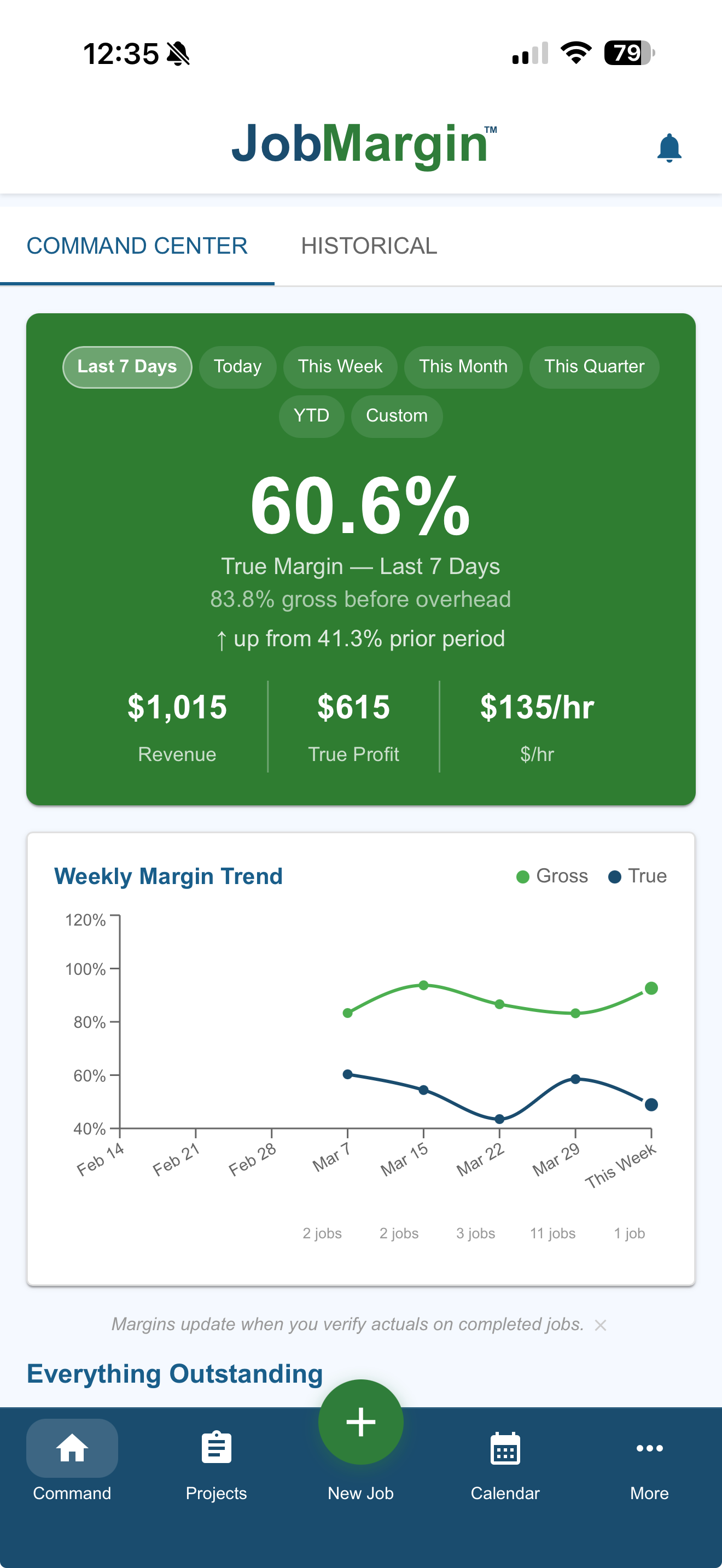
1. Command Center Review. First thing every morning, before I touch a lead or return a call, I open the Command Center. That's my deliberate first move. Not the inbox. Not the calendar. At the top of the screen: a running margin — today, this week, this month, last seven days. Below it: Google reviews I need to send, unpaid invoices that need a follow-up, jobs ready to invoice, estimates out that need a nudge, jobs where I still owe myself an actuals update so my real cost is on the record. I clear the board before I do anything else. That's how I know the health of the business before the day runs me.
2. New Customer. Lead comes in from any channel — BNI referral, Google search, website form, email, phone. I call first. Name, email, phone, service address, what they're looking for. That conversation isn't in the software. Everything downstream of it is.
3. New Job/Estimate. I enter the property measurements — heated square footage, garage, flat work. When I can, I pull the property off Google Street View and drop the photo into the estimate. Then I build the job — quick chips if the scope is standard, full workflow if it's not. Services, direct costs, fuel, labor. Everything priced against real numbers, not a guess. When the customer opens their copy, the front of their house is the first thing they see. Small detail. It lands.
4. Verify Estimated Profit Margin. This is where the whole page you're reading comes from. The margin card on the estimate screen shows me what I keep — not gross revenue, not gross margin, true margin after my indirect cost. If the number's right, I send. If it isn't, I don't. You'd never click send in the blind.
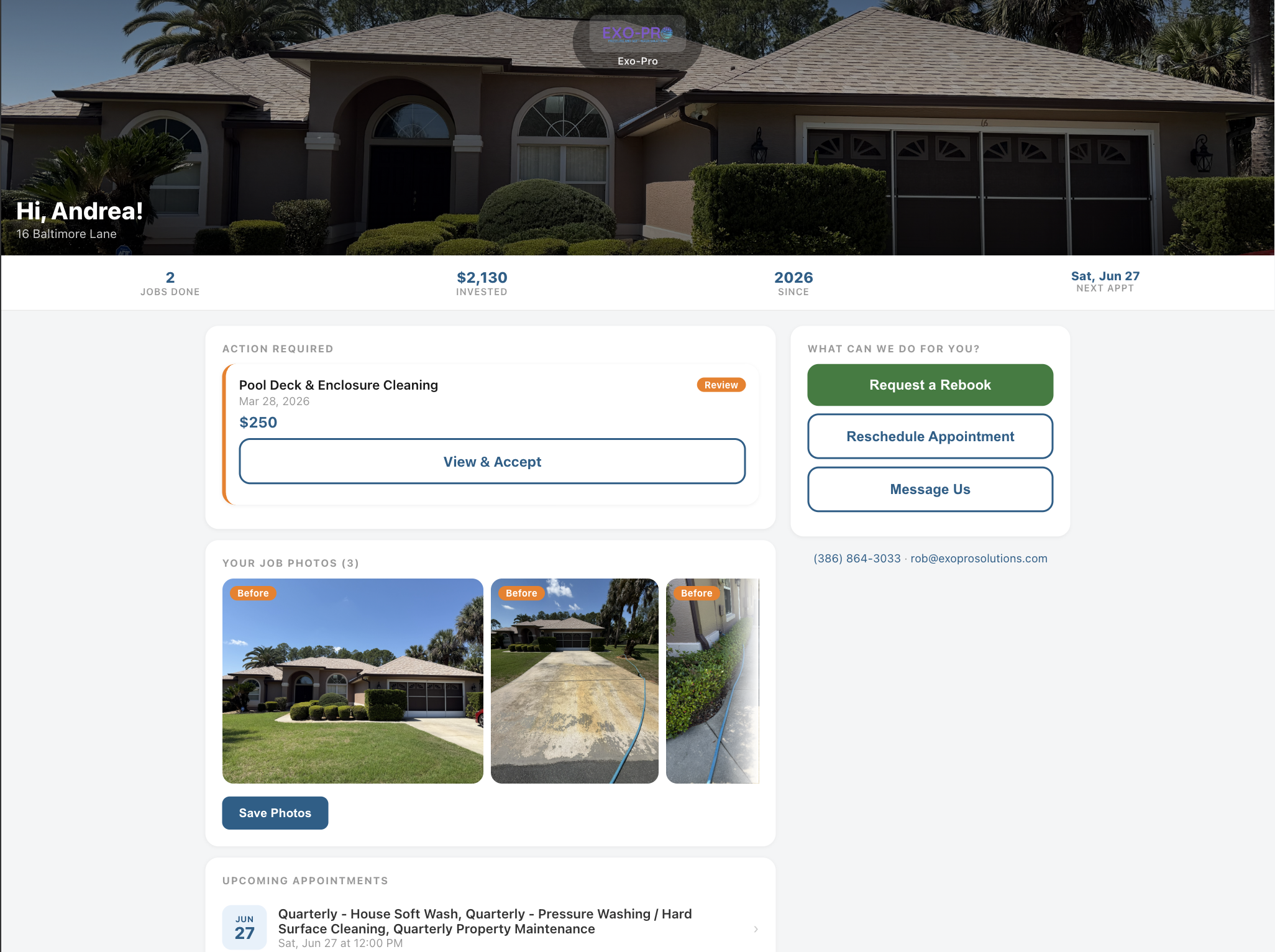
5. Estimate Delivery and Acceptance. Professional and Enterprise customers get a permanent customer portal — they see the estimate, the photo of their property, the terms and conditions, and they accept it there. Starter customers get a direct estimate link for that single transaction, which is the right shape for a one-time job. Either way, the app notifies me when they sign, and the job moves to Won on the dashboard.
6. Schedule Job. I put the job on the calendar and assign myself or a crew member. If it's a crew member, the job shows up on their timecard as an upcoming direct job — before I ever tell them about it.
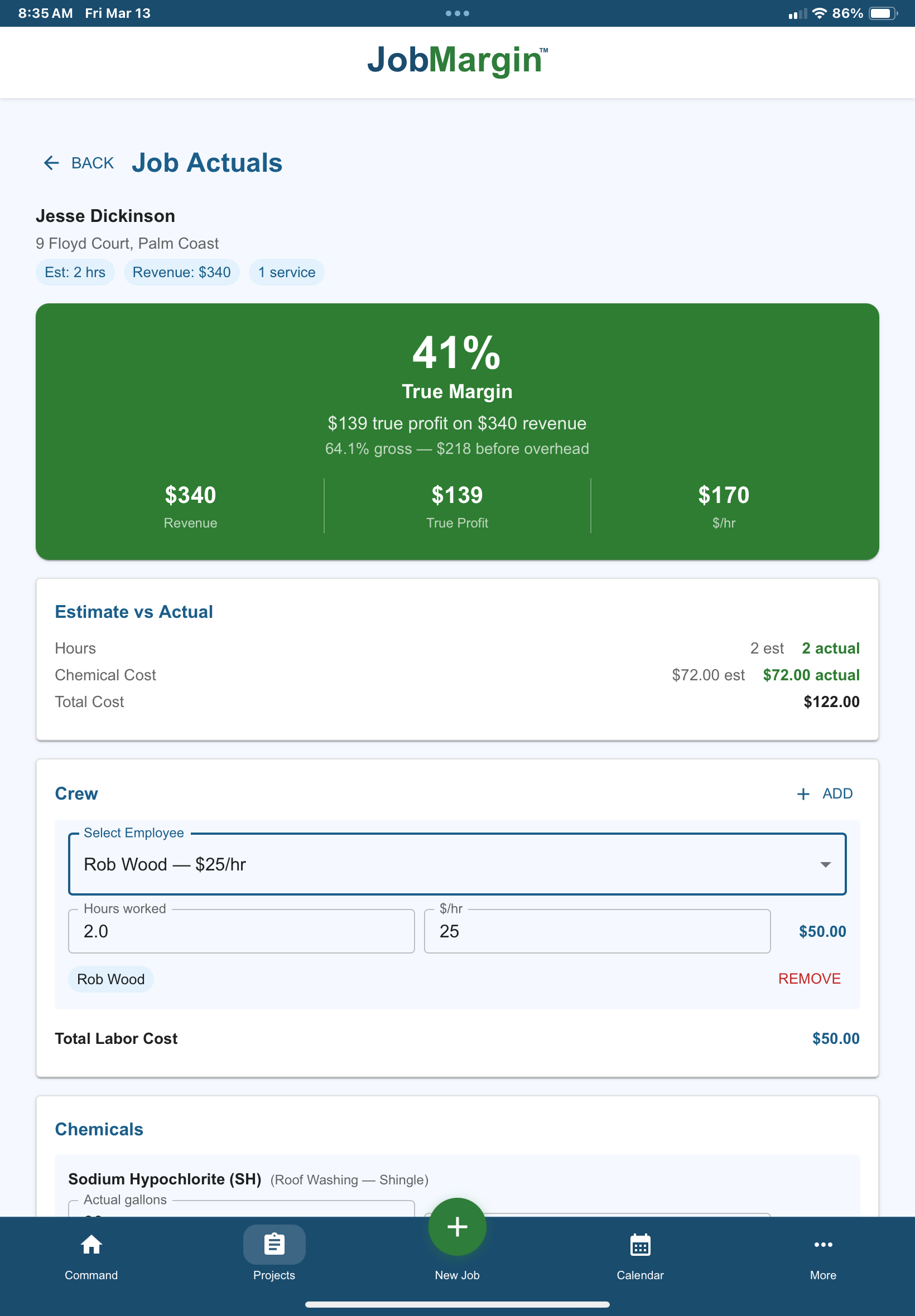
7. Job Completion – Update Actual Costs. When the work's done, I update the actuals on the job — time, materials, fuel. Now I have a real picture of what the job cost me, not an estimated one. The margin updates. That's the data that makes next year's pricing sharper.
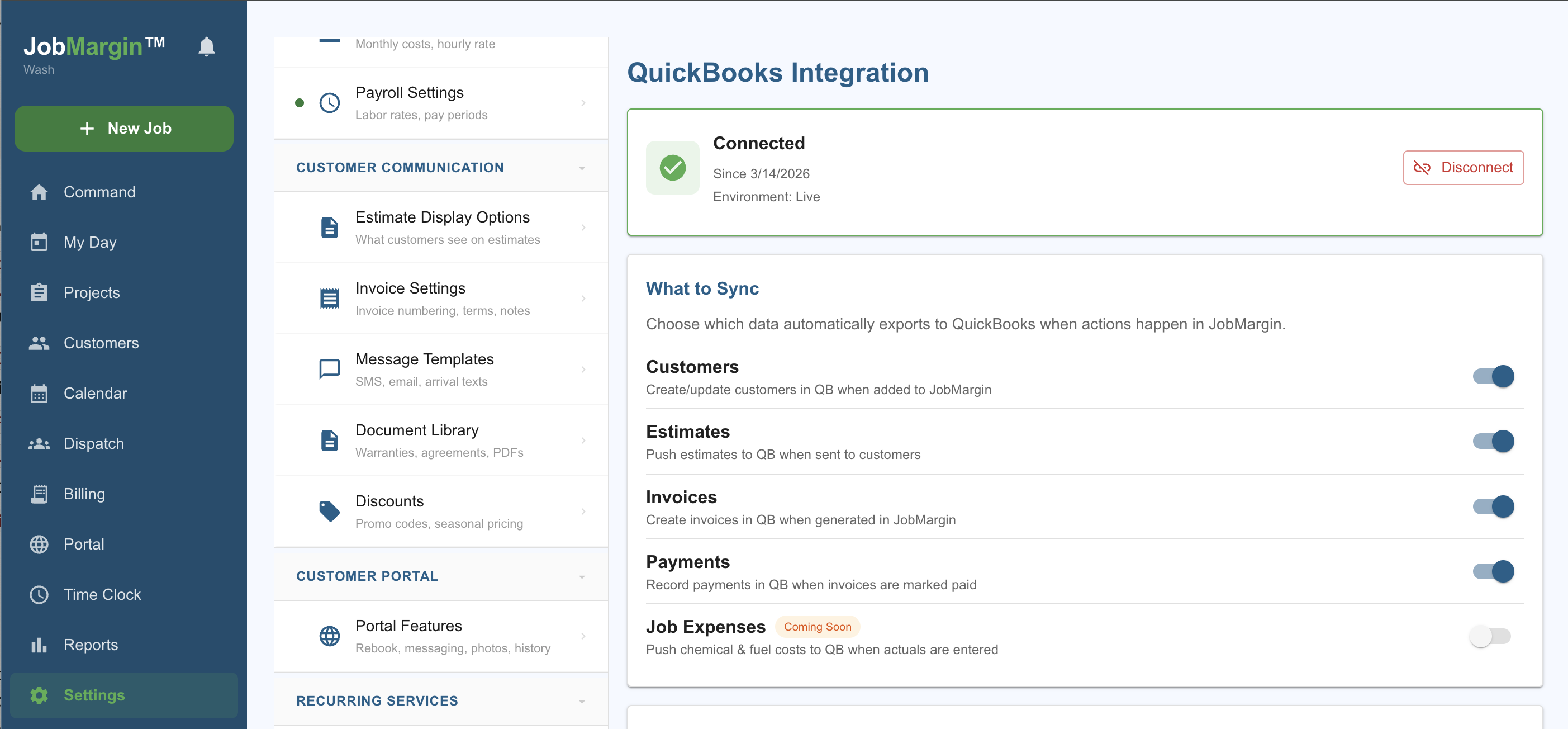
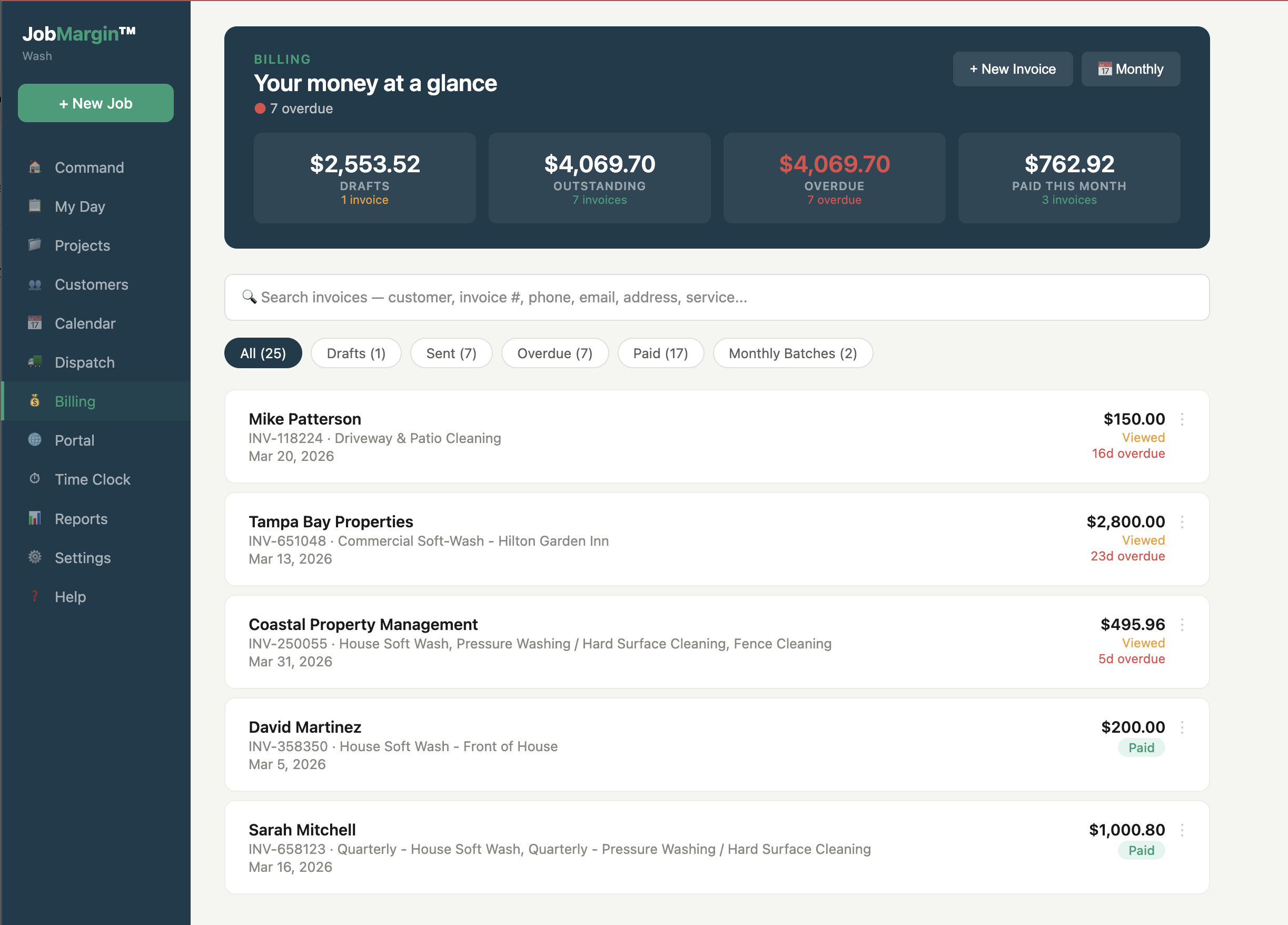
8. Send Invoice and Get Paid. Generate the invoice, send it, customer pays. Merchant services are integrated — convenience fee pass-through, so the customer covers processing and I net 100%. Estimate, invoice, payment all sync to QuickBooks automatically. My books are right without me touching them.
9. Google Review and Rebooking. Next time I log in, the Command Center has a nudge telling me the job's ready for a Google review request. The customer gets it. The cycle starts over — same board, same margin number at the top.
That's one job. Instance-driven trades like pressure washing live in this cycle: one customer, one interaction, earn the rebook twelve months later or don't. Recurring trades — lawn care, cleaning, pool service — open the Command Center the same way, then fork at scheduling: instead of one job at a time, you map a week of routes, hit notify, and the whole crew gets their day sent to their phones. Same engine. Different cadence.
Know your number
When I first started I priced by the hour, like most contractors do. I'd quote $150 an hour, stretch to $200, eventually push to $425 an hour for commercial work. That's how most of us set rates. Look at labor, look at materials, add some margin, call it good.
That's the problem.
Most pressure washers don't account for the cost of leaving the driveway. Truck insurance, commercial liability, licensing, equipment depreciation, fuel, chemicals, workers comp, software, credit card interest, uniforms — all the things that it takes to run your business that are indirect costs, meaning they're not directly related to a single project. They come off the top every month whether you worked or not.
I ran the numbers on my own business last year. It costs me $59.63 per hour of indirect cost to pay myself a living wage and cover all my insurances, loan payments, truck payments, and everything else. If my truck is leaving the driveway, I know it costs me nearly $60 an hour just to operate.
Armed with that number, I price differently. I lose jobs I should lose. I win jobs I used to lose by being too aggressive. I know exactly how far I can flex before a job becomes unprofitable. I lost a roof job earlier this year because I priced it at $0.40 a square foot. The numbers showed me later I could have flexed to $0.20 and still made 35%. I would have won the work. I didn't have the margin card in front of me at the time. I do now.
Before JobMargin, I was doing this math manually on the back of estimates. Now it's on every estimate screen, every time.
Real rates
Most pressure washing sites won't publish their rates. I'll publish mine. These are my starting numbers for residential and commercial work in North Florida. They flex up or down based on condition, access, and what other work's on the truck.
Rates are a starting point, not a menu. The actual price comes from the margin card on the estimate screen — the one that tells me what I'll keep after labor, materials, fuel, and the $59.63/hour it costs to run the business.
If you're quoting in a comparable market and your numbers look very different from these, that's not me telling you I'm right. It's me telling you that knowing your number is the difference between running a business and running a hobby.
The real cost
There's a type of contractor I call the beer and cigarettes guys. You've met them. Eight hundred dollar pressure washer from the big box store, truck they didn't insure as a commercial vehicle, no liability policy, no licensing, no business bank account. They quote $99 for a driveway and think they made $50 an hour.
They didn't. They just don't know what the real cost was.
The problem isn't that they're cheap. The problem is that they drag the market down for everyone who's running a legitimate business. A homeowner who gets three quotes — $99, $225, $225 — doesn't understand why two contractors are "$126 more expensive" when the real comparison is "two contractors know what a pressure washing job actually costs to do safely, and one of them doesn't."
The beer and cigarettes job also costs the homeowner money later. Pressure applied to concrete that's less than three years old strips the cream coat off the top and writes the contractor's name into the surface permanently. Oxidized vinyl siding gets written into the same way. Shingle roofs don't survive the wrong pressure. A $150 driveway from the wrong contractor can turn into a thousand-dollar repair a year later.
If you're a legitimate pressure washing contractor competing against the $99 guy, you don't beat him on price. You beat him on trust. You show up on time. You have insurance. You do what you say. You charge what the work actually costs. And you use a tool that lets you know, before you send the estimate, whether the number you're quoting will actually pay your bills.
Scale ready
Most pressure washing software in the category is built for one-truck residential operators. That's fine for starting out. It breaks the moment you land your first real commercial job.
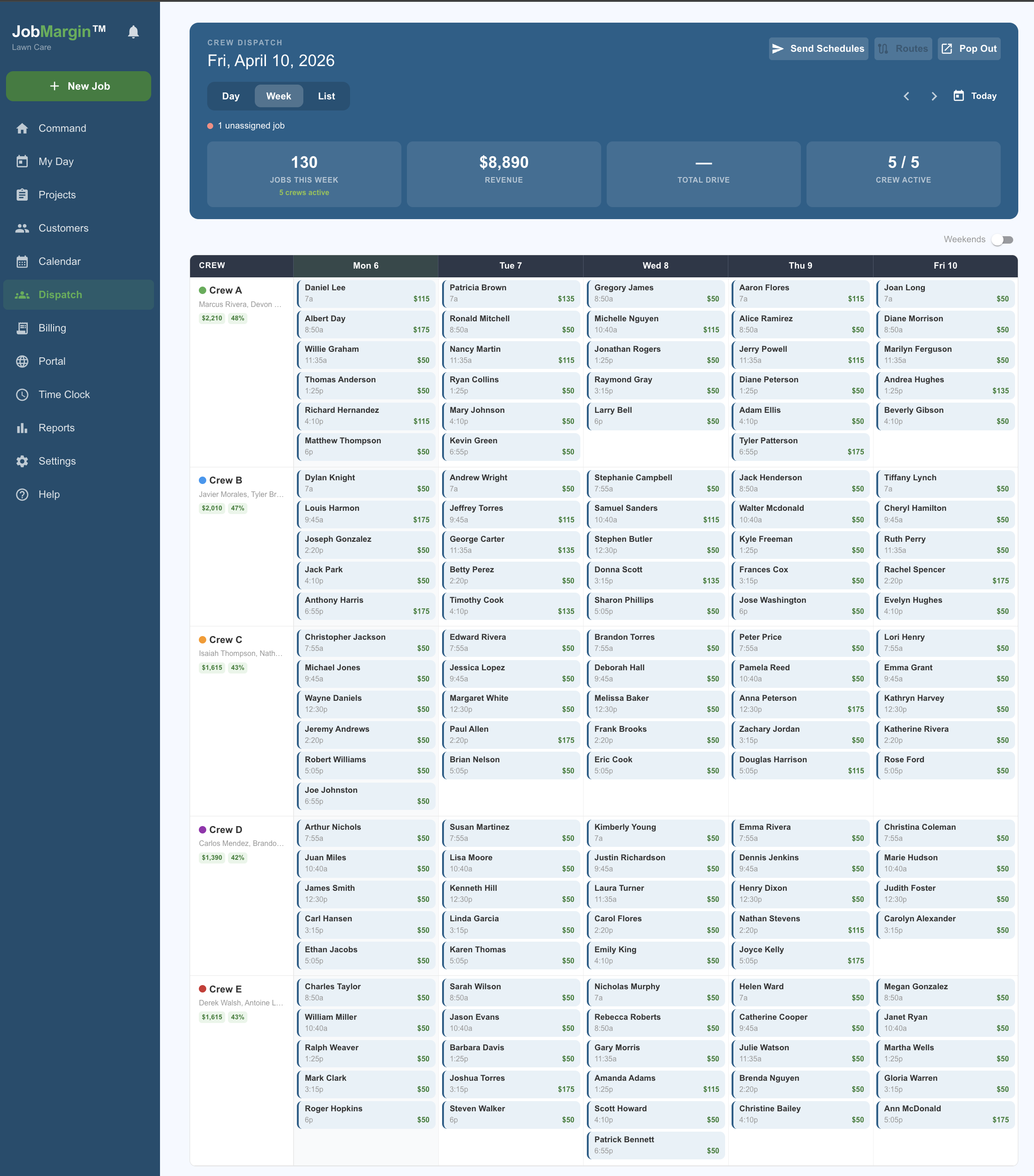
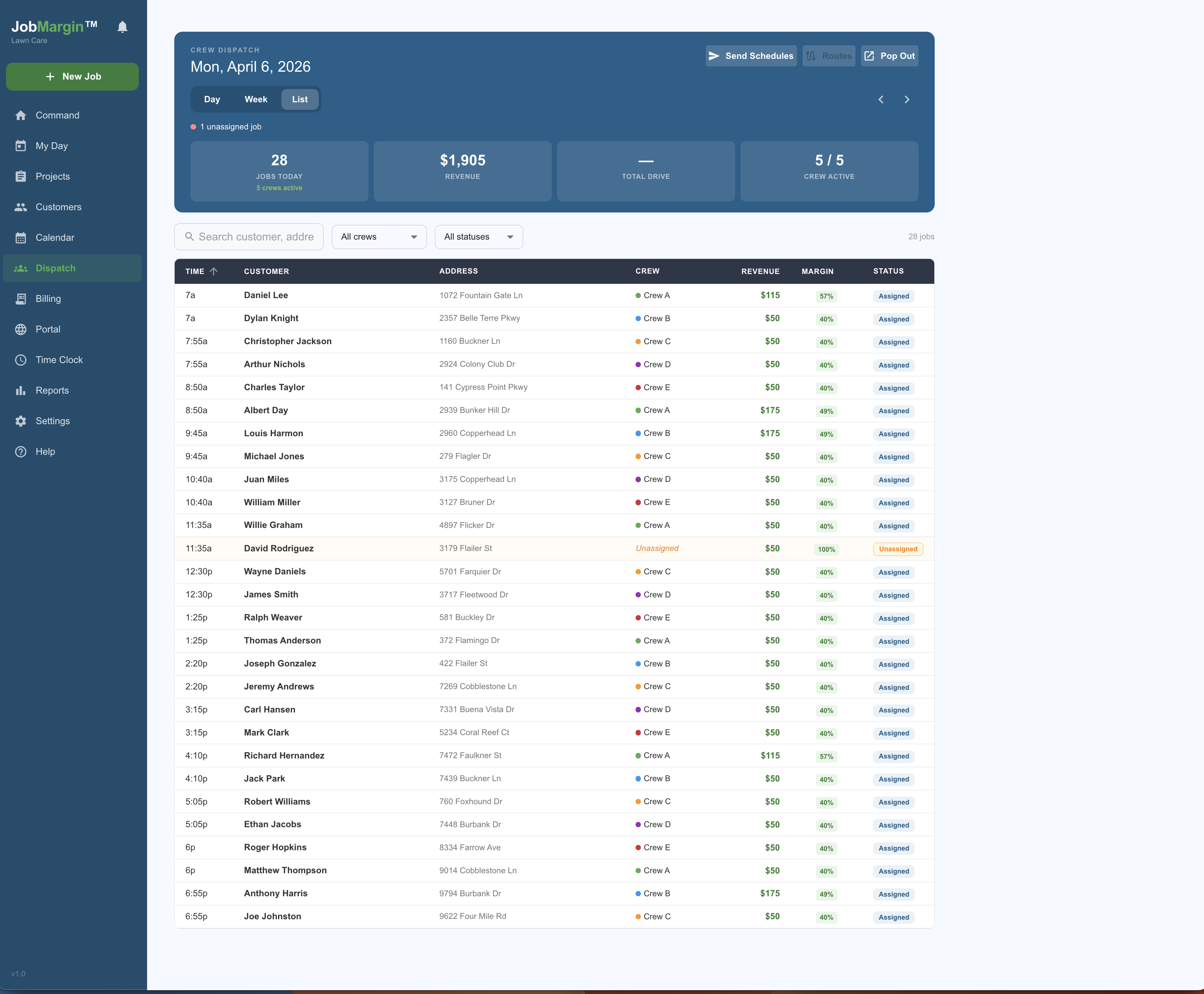
JobMargin handles the crew math for real. Here's what I've done this year using it:
Day Planning View
Week View
Day List ViewEfficiency
One mistake I made early was buying a 5.5-gallon-per-minute machine when I should have stretched for an 8. Pressure washing is about volume, not pressure — a bigger gallon-per-minute rating cuts your job time in half. I would spend an extra $500 today to save fifteen minutes tomorrow.
My rig now runs 10-gallon machines, electric reels, six buffer tanks on a box truck I call my rolling efficiency truck. Remote controls on the chemicals and the machines. Onboard power. Drone capability for roofs I can't reach safely any other way. All of it designed to drop setup and breakdown time on every job.
JobMargin keeps the route math tight so the equipment gets used efficiently. I batch jobs into like neighborhoods on similar days — drive less, work more. If my truck is rolling, I want to be making $1,600 a day in revenue. The software keeps the schedule honest on that target.
What you get
The margin card sits on the estimate screen as you build it. Enter your services, your materials, your expected labor hours. The card updates live. You see revenue, gross margin, and true margin after your indirect costs are allocated. Before you click send.

Starter, Pro, or Enterprise — QuickBooks Online sync comes included. Most of the category gates this to the second or third pricing tier. I don't. If you're running a business you need to be running books properly from day one.

The full flow. PDF generation, e-signature, deposits, partial payments, recurring billing for maintenance customers. Convenience fee pass-through is built in.

Quarterly house washes. Monthly commercial routes. Prepaid annual contracts. JobMargin tracks each recurring service separately, writes the next visit automatically, and invoices however your customer wants to be billed.

Day view, week view, list view. Move crews between jobs. Handle the callout when someone's sick. Print the day's schedule for a crew leader who prefers paper. Built because I needed it.

Every customer gets a permanent link. They see service history, before-and-after photos, request re-bookings, and receive campaigns you push to them directly. It's how you stay top of mind for the annual house wash.
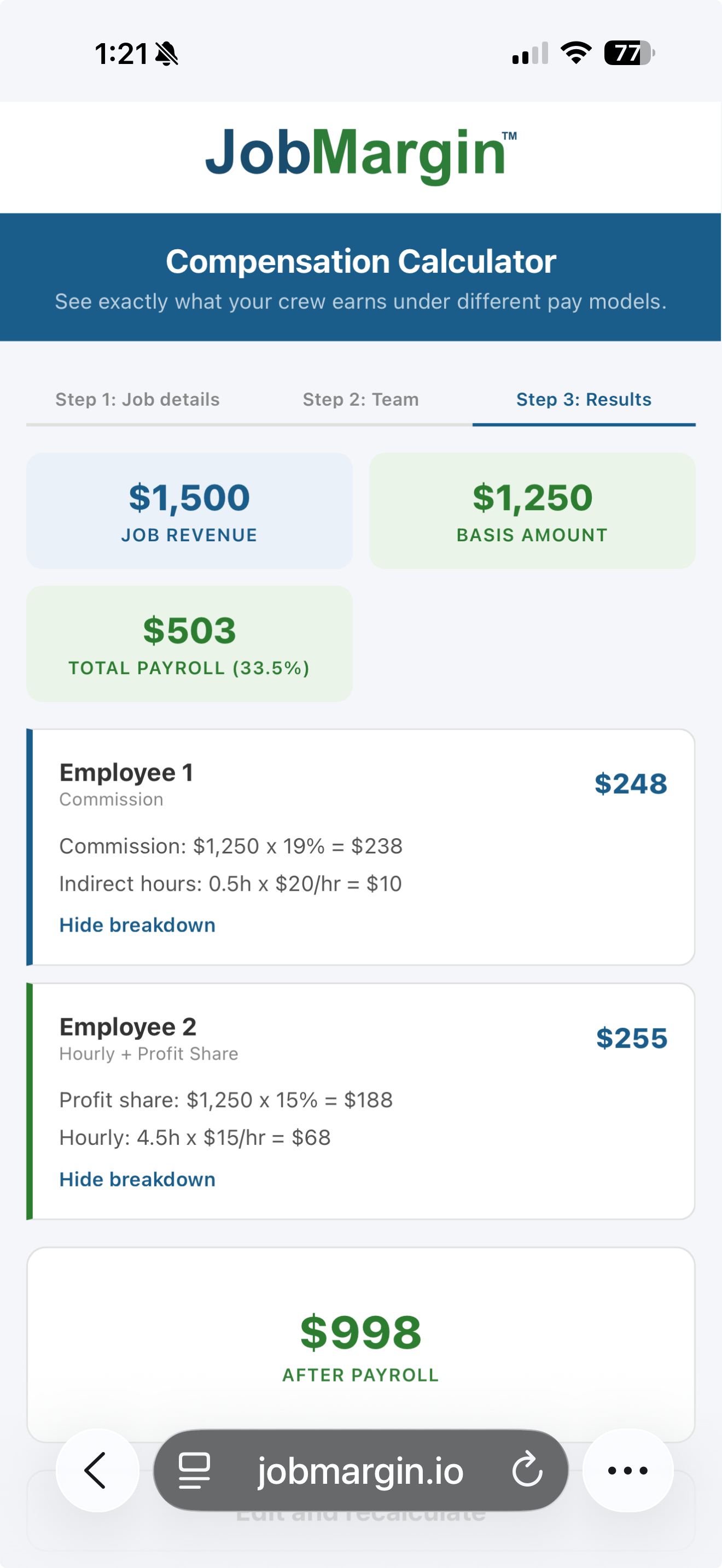
Run one job through the compensation calculator. See what JobMargin would tell you about its margin.
Try the Calculator →
Simple pricing
Every plan includes a 14-day free trial with full access to all features.
Starter
One user. QuickBooks sync included. True margin on every estimate. Scheduling, customer management, payment engine. 30 jobs per month.
Professional
Five users. Everything in Starter plus crew management, customer portal, monthly invoice builder, employee app access. Unlimited jobs.
Available add-ons
Crew Dispatch +$49/mo
Extra users +$10/user/mo
Extra SMS +$19/mo
Enterprise
Unlimited users. Everything in Pro plus full crew dispatch, crew margin reporting, campaigns and offers, priority support.
No annual contracts. No credit card required for the free trial. Cancel anytime from inside the app.
Built by a contractor
I'm not a software developer. I'm a pressure washing contractor with a finance MBA, eleven years training crew chiefs in the Air Force, ten years managing faculty at a university, and a BNI chapter to run. I built JobMargin because I kept losing money on jobs that looked profitable on paper and I got tired of finding out weeks later why.
If that's you, give it a try. The free trial is fourteen days. You don't need a credit card. You'll see your real numbers on a real estimate within the first session.
Rob Wood
Founder, JobMargin · Owner, Exo-Pro Pressure and Soft Wash
FAQ
Yes. Customer import is built in. Existing work orders can be added manually or via QuickBooks sync if you're already using QuickBooks. Dedicated migration help is included for Pro and Enterprise accounts.
Yes. The app is responsive and works on iOS and Android browsers. A native app is on the roadmap. Most pressure washing contractors run the whole day from their phone — estimates, invoicing, photos, payments. The interface is designed around that.
Gross margin is your revenue minus direct costs — labor, materials, fuel used on that job. True margin adds an allocation of your indirect costs — insurance, truck payments, software, licensing, everything that takes money off the top every month. True margin tells you what you're actually keeping. Gross margin tells you how a single transaction looked in isolation.
Yes. The Service Library comes pre-seeded with common pressure washing services — house wash, driveway, soft wash, paver sealing, roof wash — with realistic starting rates and chemical usage that you can adjust. Nothing generic. Built for the trade.
Recurring services are a first-class feature. Set the initial cleaning rate (say $300) and the recurring rate (say $150 for quarterly). JobMargin auto-generates the next visit, handles scheduling, and invoices however the customer wants — per visit, monthly, or prepaid for the year.
Yes. Most field service software gates QuickBooks Online integration to their second or third pricing tier at around $99 to $149/month. JobMargin includes QuickBooks sync starting at $59/month. If you're running a legitimate pressure washing business, your books need to be right from the beginning.
Yes. The platform handles everything from a single residential house wash to a 13-day commercial campus job in the same tool. Dispatch, crew management, recurring commercial contracts, and commercial-scale invoicing are all built in.
No. The fourteen-day free trial requires no credit card. You can import a customer list, build an estimate, and see your real margin number before you commit to anything.
If you're a pressure washing contractor who wants to see true margin on every estimate before you send it, start the free trial. Fourteen days. No credit card.